
Get founder-led onboarding at 60% off first month. 4 slots remaining for next 4 weeks.
Context-Driven QA for Agentic Teams.
Ensure your QA is properly covering what matters to your business. Push releases with confidence.
1200
Hours Saved
Per Month
10X0X
Faster
Authoring
80%0%
More
Coverage
$450K$0K
Annual
Savings
How It Works
Agent friendly Requirements
• User stories and scenarios — managed as specs in your codebase
• Agents get full product context for accurate execution
• Ensure agent-readiness of specs with DeFOSPAM checks
Agentic QA workflows throughout SDLC
• Run 12+ QA workflows at key SDLC points
• Run locally with humans in the loop
• Run on cloud agents for autonomous fixes on triggers
• Keep policy and agent traceability for every action
QA Governance — built for agentic era
• Enforce agent authoring with spec traceability
• Execute UX checks and security scans agentically
• Make coverage transparent with verification evidence
• Feed QA insights back to agents for iteration

Scroll to explore
Test Planning
For the Agentic Era
Agents work best with plain text files in source control; not DB-centric, form-driven tools.
In TestChimp, user stories and test scenarios live as structured .md specs, making them:
Version-controlled alongside your code
Readable and editable by humans
Directly consumable by AI Agents

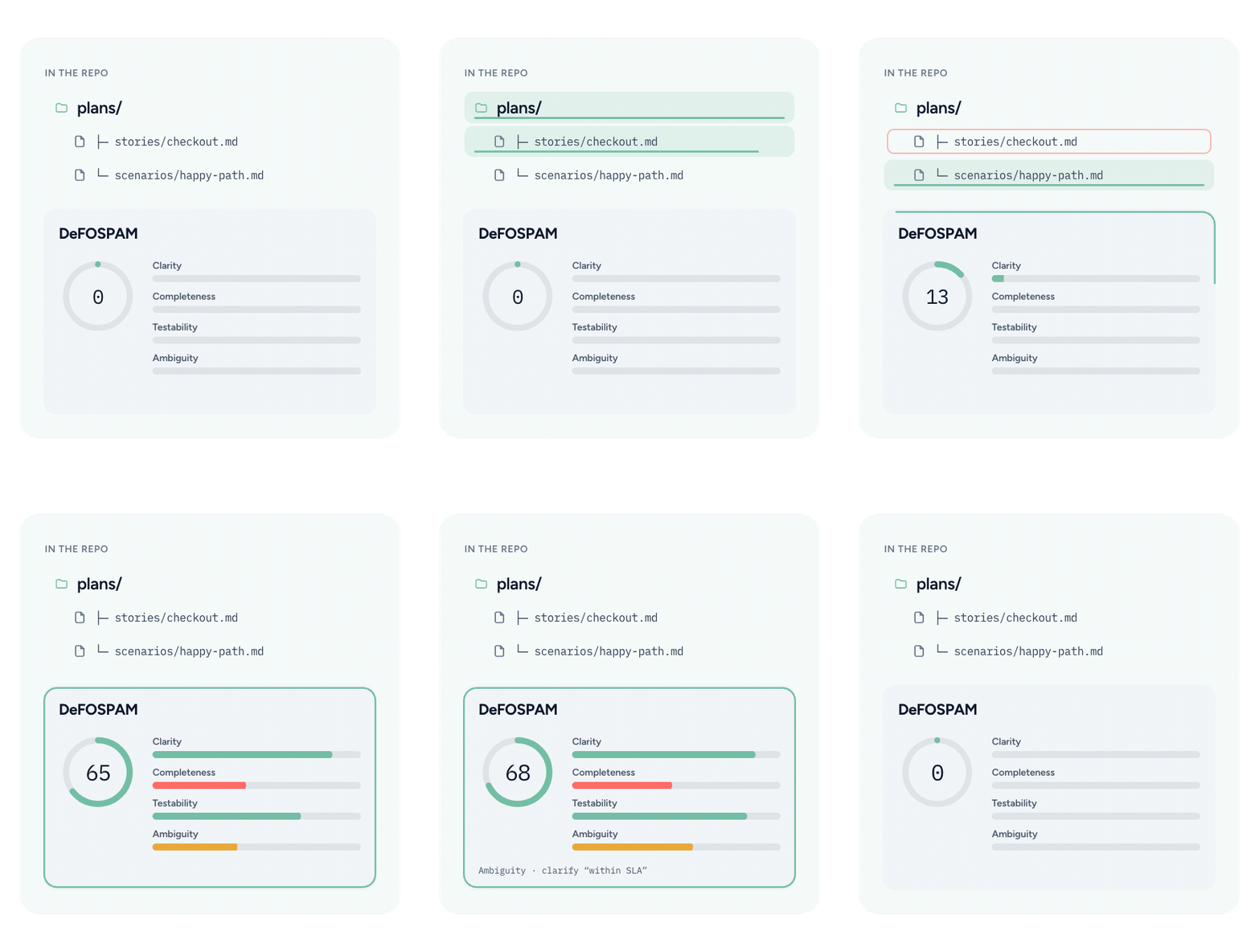
Ensure Specs are Agent-Ready
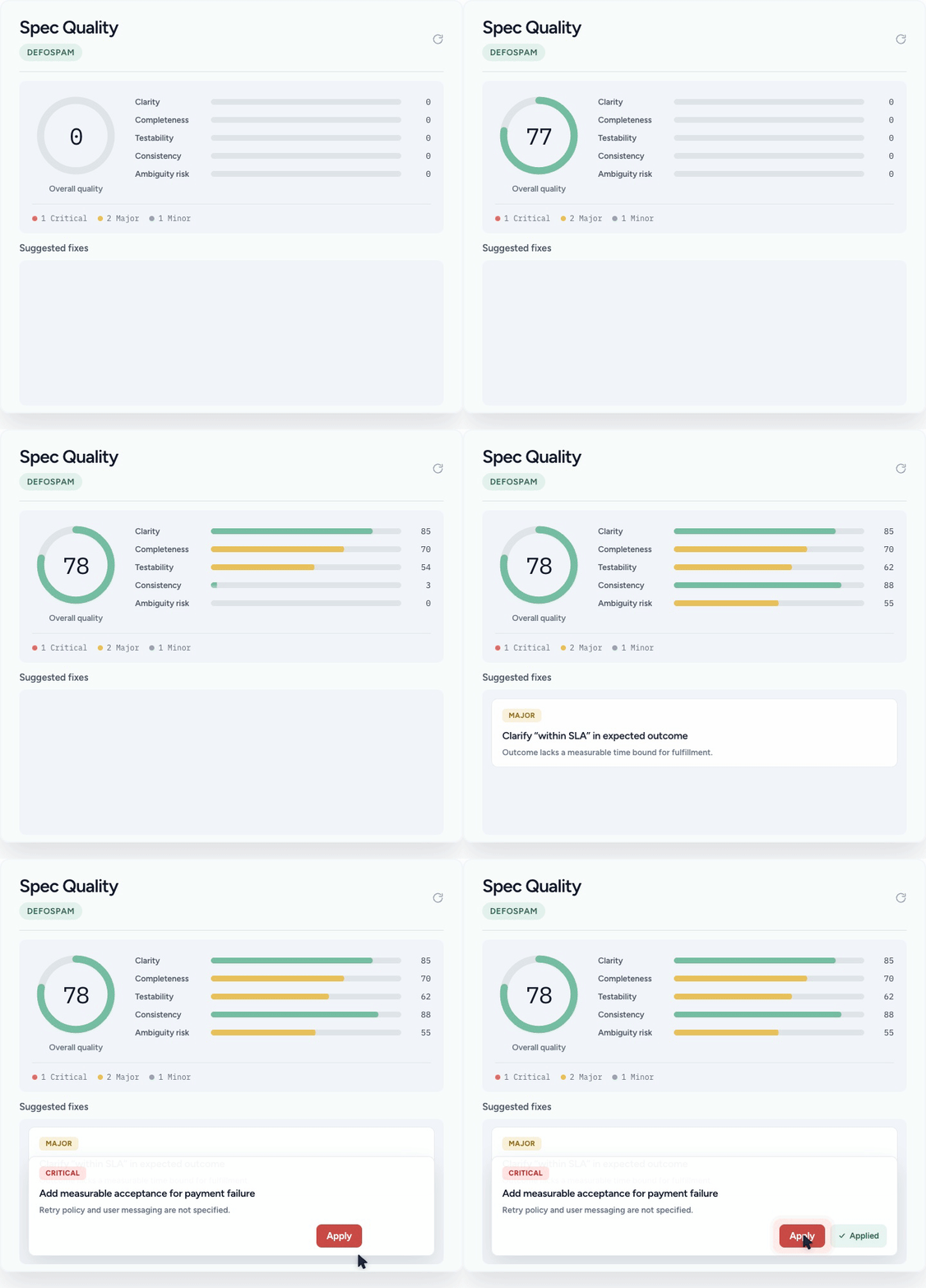
Ambiguous, incomplete or untestable requirements lead to agents hallucinating and filling the gaps - resulting in poor agent execution.
Run DeFOSPAM checks to ensure agent-readiness
Track & govern spec quality, apply fixes with one-click
Quality requirements in -> Quality output
Human Friendly Lifecycle Management
Get the familiar Jira-like lifecycle management - on top of your specs.
Kanban boards, Folder based views for easier organization
Manage due dates, assignees, labels, priorities
Collaborate with your team, and view coverage insights aligned with spec folder hierarchy

Agentic QA Workflows.
At each phase of SDLC
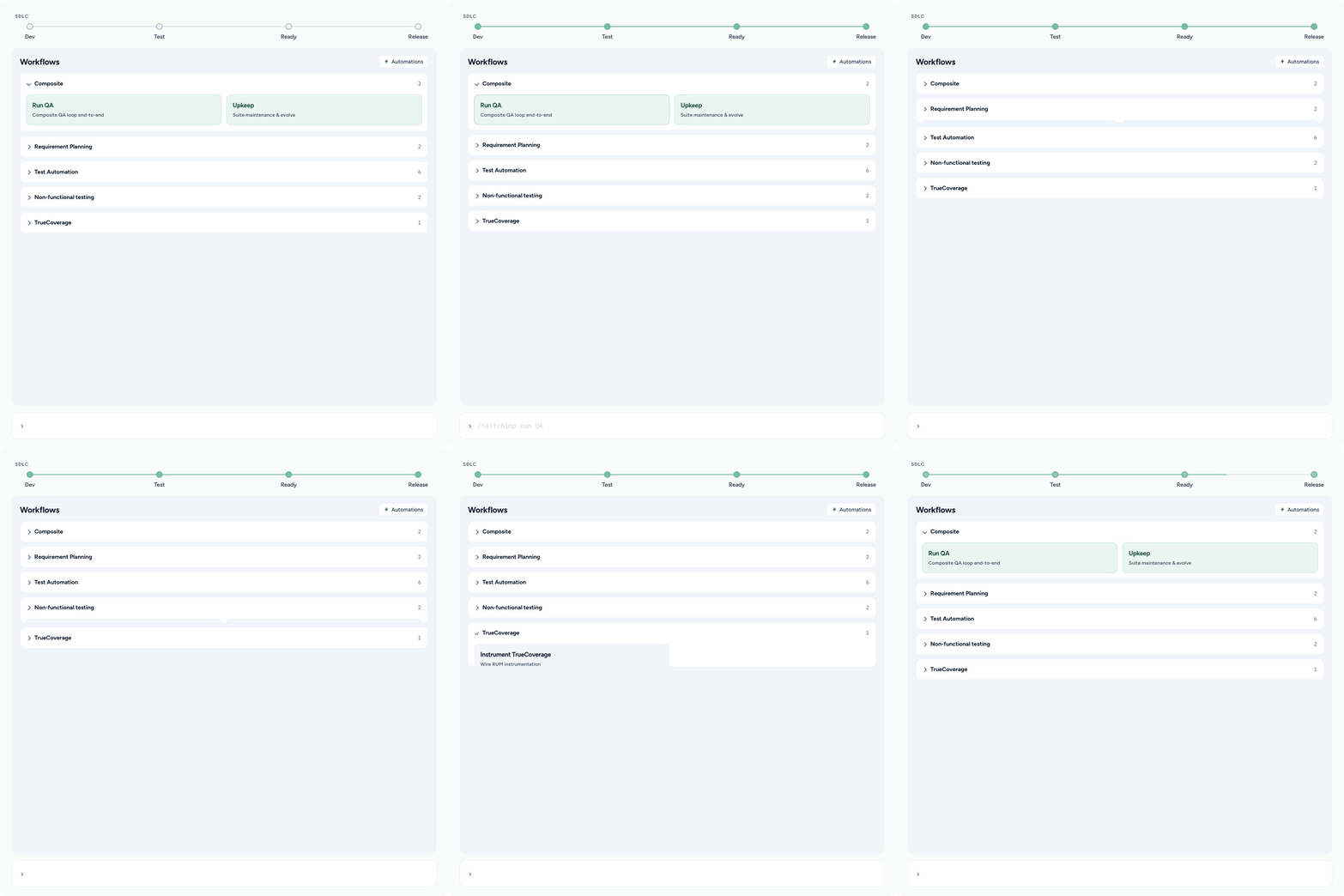
QA isn’t a phase at the end of the sprint. It spans your entire SDLC. TestChimp gives your agents purpose-built QA workflows—so quality work happens when it should, with the context it needs.
Modular workflows for common QA jobs: validate specs, write tests after a PR, investigate batch failures, instrument for TrueCoverage, and more.
Composite workflows for higher-level outcomes: “Run QA,” “Release readiness,” or “Upkeep.”
Trigger workflows manually, from your IDE, in CI, or automatically from repository events.

Policy Traceability for Agent Actions
Each workflow is backed by project specific policies you set - for behaviour guidance.
Give agents clear, project-specific guidance—and retain the evidence to prove how every action was made
Every agent action is linked to its workflow, policy, and exact policy version - so you can optimize the agent policies
Review agent work alongside human activity in a shared collaboration timeline.
Run Locally in IDE - or on Cloud Agents
Keep using the agents and environments your team already trusts. TestChimp orchestrates the QA system around them.
Install the TestChimp Skill and CLI; run workflows interactively with your local agent.
Agents retrieve live QA context: untested specs, production-behaviour signals, failure history, release contexts and more.
Every agentic activity is reported back to TestChimp for auditability and team visibility.
Configure cloud agents to run workflows on event triggers - put QA on auto-pilot.

QA Brain — The Context Layer
Your agents already have context of your codebase. TestChimp builds a QA knowledge graph for your project, generates dynamic intelligence insights that are utilized by agents to continuously improve your QA posture.
Semantic Graph of QA Entities
A connected model of what your product promises, how it behaves, and how it is verified.
• Seamlessly traverse through stories, specs, UI areas, tests, test runs, issues, and releases
• Identify semantic clusters of tests for bloat detection and cleanup
• Identify areas impacted by a release to run smart regressions

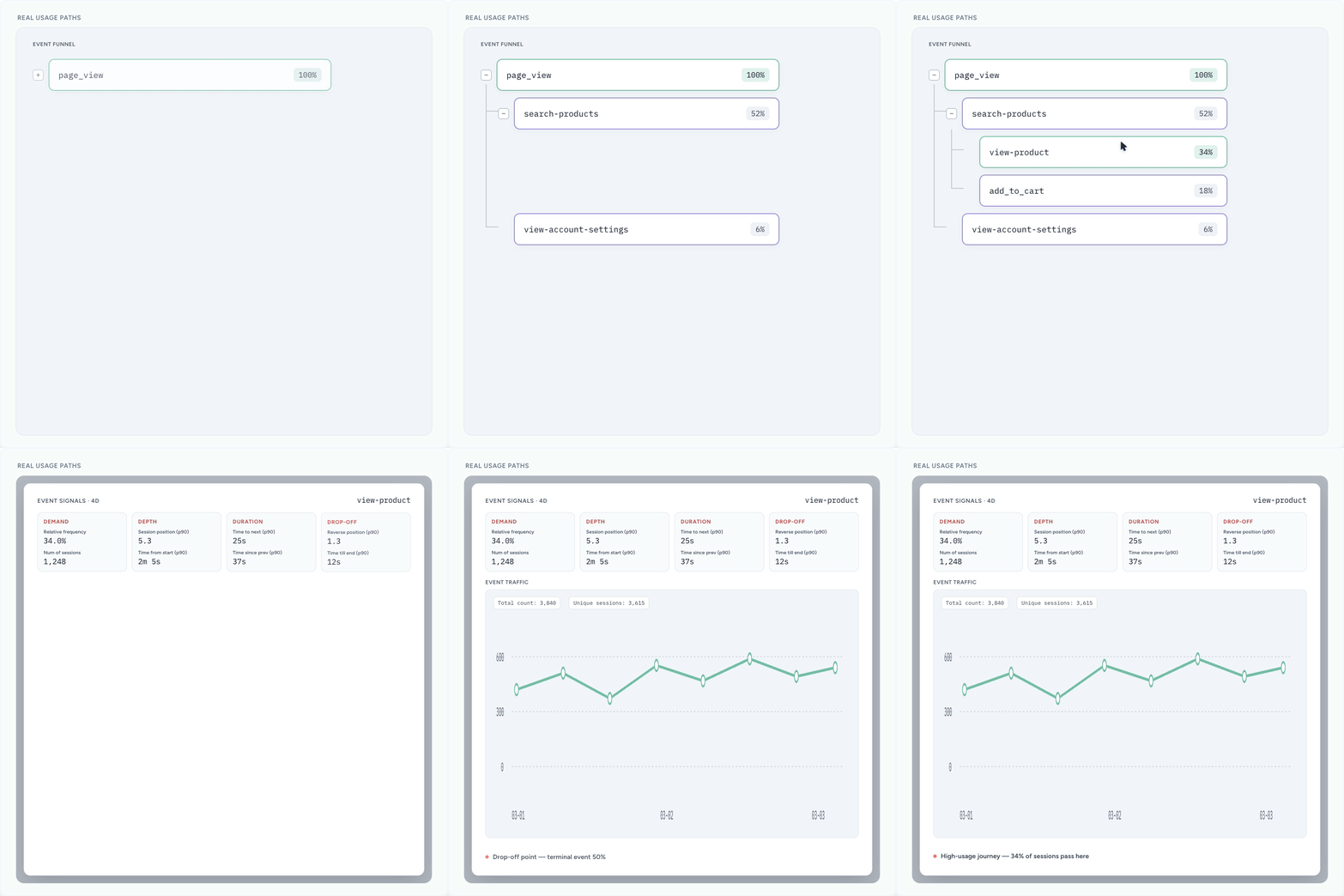
QA informed by Real user behaviour insights
Optimize QA workflows informed by how your users are actually using the product
• Surface critical journeys, high-traffic paths, and friction points from real usage.
• Identify flows that deserve stronger regression coverage.
• Run performance tests to ensure real traffic patterns are supported
Gaps in Testing & Risks
Know what functionalities are untested, weakly tested, or stale.
• Detect untested requirements and tests that no longer match the product.
• Identify real user behaviours / segments not covered by tests
• Turn gaps into actionable insights for agents to course-correct

Rich Contextual Evidence
Give agents the full evidence needed to make correct fixes, rather than patchwork guesses.
• Execution histories for flaky tests and recurring failure patterns.
• Comprehensive manual-session captures for auditable evidence & rich context for E2E test creation.
• Full Playwright traces to fix tests effectively.

Atlas - Insights aligned with App UI Structure
See quality through the structure of the product your users see.
• Track UX / Performance / Accessibility issues on each screen in your app
• Manage visual regression lifecycle (baseline image approval and tracking)
• Give agents App-structure-aware context to investigate & resolve issues

Scroll to explore
Git-native Release Governance.
Releases should be backed by evidence—not optimism. TestChimp brings your release scope, testing evidence, risks, and agent activity into one Git-native view.
Track functional validation across automated and manual testing with Test Runs.
Capture auditable manual testing through the Chrome extension.
Define release scope using the spec folders.
Collaborate with your team seamlessly - across agents and humans


Beyond Functional: UX, Performance, Security
Functional tests prove that software works. Release checks prove it is ready for production use.
Catch UX issues (visual, usability, accessibility, UI-performance) with ExploreChimp
Run SAST, DAST, dependency, and vulnerability checks scoped to release changes.
Detect visual regressions before UI drift reaches customers.
Consolidate findings into the same release evidence—not another disconnected dashboard.
Git Backed Release Delta Insights
Understand exactly what changed - and what that change means for quality.
• Identify changed specs, product areas, UI surfaces, tests, and dependencies.
• Run smart regression tests based on release deltas
• Track tests added, stories updated, issues introduced, and issues resolved.
• Detailed PDF reports - ready for sharing with stakeholders.
• Agentic actions tracked with git commit SHAs - bringing clarity to agent work during releases.

Tribal Knowledge - No Longer Lost
TestChimp integrates deeply with how your team already works, to capture tribal knowledge and ensure your QA surface evolves alongside your product development
Meet Bots
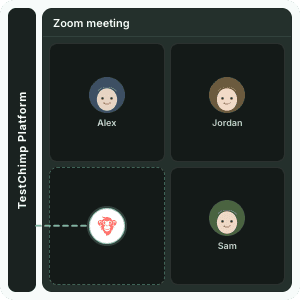
You decide on the requirements, design plans during your zoom calls. TestChimp's Meet bots can join your calls, to capture those decisions, and jump directly to QA workflows from the conversation context.
Get in-meeting assistance with the full product context, assign tasks directly from the meeting, and go beyond QA with custom bots.
AgentWatch
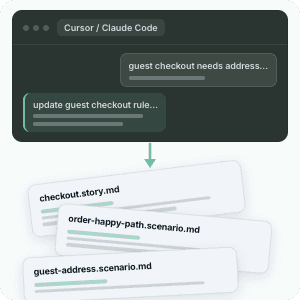
Your QA authored the requirements, but during implementation, they get refined, constraints get detailed - via interactions with coding agents. However, your test cases remain stale.
AgentWatch monitors those conversations to identify requirement updates, and auto-updates your test surface, so that your QA keeps up.
Scroll to explore
TestChimp Studio
IDE for Software Delivery
Go from requirement planning, to confident release pushes - all in one app.
Collaborate with your team with story kanbans
Go from requirements to implementation, run QA workflows seamlessly
Stop jumping through multiple tools for release management, issue tracking, coverage governance
Use with ChimpHands, your own LLM API key, or connect a local LLM

Guides for QA, testing and dev teams.
Over 400 how-tos, testing techniques and comparisons, grouped by what you are trying to do.
TestChimp guides
Set up TestChimp, plan tests and run QA on every pull request.
Browse guides →
QA guides
Test auth, payments, OTP, email and UI patterns with Playwright.
Browse guides →
Dev guides
QA for an agentic SDLC: AI-written tests, CI and release confidence.
Browse guides →
Comparisons and tools
TestChimp vs other tools, plus open-source Playwright tools.
Browse guides →
Trusted by over 400 startups and enterprises




Upgrade Your QA Platform Today.

Products
Compare with
Alternatives and migration
Context-Driven QA for Agentic Teams.
Ensure your QA is properly covering what matters to your business. Push releases with confidence.
1200
Hours Saved
Per Month
10X0X
Faster
Authoring
80%0%
More
Coverage
$450K$0K
Annual
Savings
How It Works
Agent friendly Requirements
• User stories and scenarios — managed as specs in your codebase
• Agents get full product context for accurate execution
• Ensure agent-readiness of specs with DeFOSPAM checks
Agentic QA workflows throughout SDLC
• Run 12+ QA workflows at key SDLC points
• Run locally with humans in the loop
• Run on cloud agents for autonomous fixes on triggers
• Keep policy and agent traceability for every action
QA Governance — built for agentic era
• Enforce agent authoring with spec traceability
• Execute UX checks and security scans agentically
• Make coverage transparent with verification evidence
• Feed QA insights back to agents for iteration
Scroll to explore
Test Planning
For the Agentic Era
Agents work best with plain text files in source control; not DB-centric, form-driven tools. In TestChimp, user stories and test scenarios live as structured .md files, making them:
Version-controlled alongside your code
Readable and editable by humans
Directly consumable by AI Agents
Ensure Specs are Agent-Ready
Ambiguous, incomplete or untestable requirements lead to agents hallucinating and filling the gaps - resulting in poor agent execution.
Run DeFOSPAM checks to ensure agent-readiness
Track & govern spec quality, apply fixes with one-click
Quality requirements in -> Quality output
Human Friendly Lifecycle Management
Get the familiar Jira-like lifecycle management - on top of your specs.
Kanban boards, Folder based views for easier organization
Manage due dates, assignees, labels, priorities
Collaborate with your team, and view coverage insights aligned with spec folder hierarchy
Agentic QA Workflows.
At each phase of SDLC
QA isn’t a phase at the end of the sprint. It spans your entire SDLC. TestChimp gives your agents purpose-built QA workflows—so quality work happens when it should, with the context it needs.
Modular workflows for common QA jobs: author stories, validate specs, write tests after a PR, fix test failures, and more.
Composite workflows for higher-level outcomes: “Run QA,” “Release readiness,” or “Upkeep.”
Trigger workflows manually, from your IDE, in CI, or automatically from repository events.
Policy Traceability for Agent Actions
Each workflow is backed by project specific policies you set - for behaviour guidance.
Give agents clear, project-specific guidance—and retain the evidence to prove how every action was made
Every agent action is linked to its workflow, policy, and exact policy version - so you can optimize the agent policies
Review agent work alongside human activity in a shared collaboration timeline.
Run Locally in IDE - or on Cloud Agents
Keep using the agents and environments your team already trusts. TestChimp orchestrates the QA system around them.
Install the TestChimp Skill and CLI; run workflows interactively with your local agent.
Agents retrieve live QA context: untested specs, production-behaviour signals, failure history, release contexts and more.
Every agentic activity is reported back to TestChimp for auditability and team visibility.
Configure cloud agents to run workflows on event triggers - put QA on auto-pilot.
QA Brain — The Context Layer
Your agents already have context of your codebase. TestChimp builds a QA knowledge graph for your project, generates dynamic intelligence insights that are utilized by agents to continuously improve your QA posture.
Semantic Graph of QA Entities
A connected model of what your product promises, how it behaves, and how it is verified.
• Seamlessly traverse through stories, specs, UI areas, tests, test runs, issues, and releases
• Identify semantic clusters of tests for bloat detection and cleanup
• Identify areas impacted by a release to run smart regressions
QA informed by Real user behaviour insights
Optimize QA workflows informed by how your users are actually using the product
• Surface critical journeys, high-traffic paths, and friction points from real usage.
• Identify flows that deserve stronger regression coverage.
• Run performance tests to ensure real traffic patterns are supported
Gaps in Testing & Risks
Know what functionalities are untested, weakly tested, or stale.
• Detect untested requirements and tests that no longer match the product.
• Identify real user behaviours / segments not covered by tests
• Turn gaps into actionable insights for agents to course-correct
Rich Contextual Evidence
Give agents the full evidence needed to make correct fixes, rather than patchwork guesses.
• Execution histories for flaky tests and recurring failure patterns.
• Comprehensive manual-session captures for auditable evidence & rich context for E2E test creation.
• Full Playwright traces to fix tests effectively.
Atlas - Insights aligned with App UI Structure
See quality through the structure of the product your users see.
• Track UX / Performance / Accessibility issues on each screen in your app
• Manage visual regression lifecycle (baseline image approval and tracking)
• Give agents App-structure-aware context to investigate & resolve issues
Scroll to explore
Git-native Release Governance.
Releases should be backed by evidence—not optimism. TestChimp brings your release scope, testing evidence, risks, and agent activity into one Git-native view.
Track functional validation across automated and manual testing with Test Runs.
Capture auditable manual testing through the Chrome extension.
Define release scope using the spec folders.
Collaborate with your team seamlessly - across agents and humans
Beyond Functional: UX, Performance, Security
Functional tests prove that software works. Release checks prove it is ready for production use.
Catch UX issues (visual, usability, accessibility, UI-performance) with ExploreChimp
Run SAST, DAST, dependency, and vulnerability checks scoped to release changes.
Detect visual regressions before UI drift reaches customers.
Consolidate findings into the same release evidence—not another disconnected dashboard.
Git Backed Release Delta Insights
Understand exactly what changed - and what that change means for quality.
• Identify changed specs, product areas, UI surfaces, tests, and dependencies.
• Run smart regression tests based on release deltas
• Track tests added, stories updated, issues introduced, and issues resolved.
• Detailed PDF reports - ready for sharing with stakeholders.
• Agentic actions tracked with git commit SHAs - bringing clarity to agent work during releases.
Tribal Knowledge - No Longer Lost
TestChimp integrates deeply with how your team already works, to capture tribal knowledge and ensure your QA surface evolves alongside your product development
Meet Bots
You decide on the requirements, design plans during your zoom calls. TestChimp's Meet bots can join your calls, to capture those decisions, and jump directly to QA workflows from the conversation context.
Get in-meeting assistance with the full product context, assign tasks directly from the meeting, and go beyond QA with custom bots.
AgentWatch
Your QA authored the requirements, but during implementation, they get refined, constraints get detailed - via interactions with coding agents. However, your test cases remain stale.
AgentWatch monitors those conversations to identify requirement updates, and auto-updates your test surface, so that your QA keeps up.
Scroll to explore
TestChimp Studio
IDE for Software Delivery
Go from requirement planning, to confident release pushes - all in one app.
Collaborate with your team with story kanbans
Go from requirements to implementation, run QA workflows seamlessly
Stop jumping through multiple tools for release management, issue tracking, coverage governance
Use with ChimpHands, your own LLM API key, or connect a local LLM
Guides for QA, testing and dev teams.
Over 400 how-tos, testing techniques and comparisons, grouped by what you are trying to do.
TestChimp guides
Set up TestChimp, plan tests and run QA on every pull request.
Browse guides →
QA guides
Test auth, payments, OTP, email and UI patterns with Playwright.
Browse guides →
Dev guides
QA for an agentic SDLC: AI-written tests, CI and release confidence.
Browse guides →
Comparisons and tools
TestChimp vs other tools, plus open-source Playwright tools.
Browse guides →
Trusted by over 400 startups and enterprises
Upgrade Your QA Platform Today.
Products
Compare with
Alternatives and migration
Get In Touch
Email:
contact@testchimp.io
Phone:
+61 434 336 795
Context-Driven QA for Agentic Teams.
Ensure your QA is properly covering what matters to your business. Push releases with confidence.
How It Works
Agent friendly Requirements
• User stories and scenarios — managed as specs in your codebase
• Agents get full product context for accurate execution
• Ensure agent-readiness of specs with DeFOSPAM checks
Agentic QA workflows
• Run 12+ QA workflows at key SDLC points
• Run locally for interactivity or via cloud agents on event triggers
• Policy and Action traceability for every action
QA Governance - for agentic era
• Spec aligned Coverage transparency with verification evidence
• Run UX checks, security scans agentically - before each release
• Feed QA insights back to agents for iteration
Scroll to explore
Test Planning
For the Agentic Era
In TestChimp, user stories and test scenarios live as structured .md specs, making them:
Version-controlled alongside your code
Readable and editable by humans
Directly consumable by AI Agents
Ensure Specs are Agent-Ready
Ambiguous, incomplete or untestable requirements lead to agents hallucinating and filling the gaps - resulting in poor agent execution.
Run DeFOSPAM checks to ensure agent-readiness
Track & govern spec quality, apply fixes with 1-click
Quality requirements in -> Quality output
Human Friendly Lifecycle Management
Get the familiar Jira-like lifecycle management - on top of your specs.
Kanban boards, Folder based views for easier organization
Manage due dates, assignees, labels, priorities
Collaborate with your team, and view coverage insights aligned with spec folder hierarchy

Agentic QA Workflows.
At each phase of SDLC
QA isn’t a phase at the end of the sprint. It spans your entire SDLC. TestChimp gives your agents purpose-built QA workflows—so quality work happens when it should, with the context it needs.
Modular workflows for common QA jobs: validate specs, write tests after a PR, investigate batch failures, instrument for TrueCoverage, and more.
Composite workflows for higher-level outcomes: “Run QA,” “Release readiness,” or “Upkeep.”
Trigger workflows manually, from your IDE, in CI, or automatically from repository events.
Policy Traceability for Agent Actions
Each workflow is backed by project specific policies you set - for behaviour guidance.
Give agents clear, project-specific guidance—and retain the evidence to prove how every action was made
Every agent action is linked to its workflow, policy, and exact policy version - so you can optimize the agent policies
Review agent work alongside human activity in a shared collaboration timeline.
Run Locally in IDE - or on Cloud Agents
Keep using the agents and environments your team already trusts. TestChimp orchestrates the QA system around them.
Install the TestChimp Skill and CLI; run workflows interactively with your local agent.
Agents retrieve live QA context: untested specs, production-behaviour signals, failure history, release contexts and more.
Every agentic activity is reported back to TestChimp for auditability and team visibility.
Configure cloud agents to run workflows on event triggers - put QA on auto-pilot.
QA Brain — The Context Layer
Your agents already have context of your codebase. TestChimp builds a QA knowledge graph for your project, generates dynamic intelligence insights that are utilized by agents to continuously improve your QA posture.
Semantic Graph of QA Entities
A connected model of what your product promises, how it behaves, and how it is verified.
• Seamlessly traverse through stories, specs, UI areas, tests, test runs, issues, and releases
• Identify semantic clusters of tests for bloat detection and cleanup
• Identify areas impacted by a release to run smart regressions
Real user behaviour insights
Optimize QA workflows informed by how your users are actually using the product
• Surface critical journeys, high-traffic paths, and friction points from real usage.
• Identify flows that deserve stronger regression coverage.
• Run performance tests to ensure real traffic patterns are supported
Gaps in Testing & Risks
Know what functionalities are untested, weakly tested, or stale.
• Detect untested requirements and tests that no longer match the product.
• Identify real user behaviours / segments not covered by tests
• Turn gaps into actionable insights for agents to course-correct
Rich Contextual Evidence
Give agents the full evidence needed to make correct fixes.
• Execution histories for flaky tests and recurring failure patterns.
• Comprehensive manual-session captures for auditable evidence
• Full Playwright traces to fix tests effectively.
Atlas - Insights aligned with UI
See quality through the structure of the product your users see.
• Track UX / Performance / Accessibility issues on each screen in your app
• Manage visual regression lifecycle (baseline image approval and tracking)
• Give agents App-structure-aware context to investigate & resolve issues
Scroll to explore
Git-native Release Governance.
Releases should be backed by evidence—not optimism. TestChimp brings your release scope, testing evidence, risks, and agent activity into one Git-native view.
Track functional validation across automated and manual testing with Test Runs.
Capture auditable manual testing through the Chrome extension.
Define release scope using the spec folders.
Collaborate with your team seamlessly - across agents and humans
Beyond Functional: UX, Performance, Security
Functional tests prove that software works. Release checks prove it is ready for production use.
Catch UX issues (visual, usability, accessibility, UI-performance) with ExploreChimp
Run SAST, DAST, dependency, and vulnerability checks scoped to release changes.
Detect visual regressions before UI drift reaches customers.
Consolidate findings into the same release evidence—not another disconnected dashboard.
Git Backed Release Delta Insights
• Identify changed specs, product areas, UI surfaces, tests, and dependencies.
• Run smart regression tests based on release deltas
• Track tests added, stories updated, issues introduced, and issues resolved.
• Detailed PDF reports - ready for sharing with stakeholders.
• Agentic actions tracked with git commit SHAs - bringing clarity to agent work during releases.
Tribal Knowledge - No Longer Lost
TestChimp integrates deeply with how your team already works, to capture tribal knowledge and ensure your QA surface evolves alongside your product development
Meet Bots
You decide on the requirements, design plans during your zoom calls. Meet bots join your calls, to capture those decisions, and jump directly to QA workflows from the conversation context.
Get in-meeting assistance with full product context, assign tasks directly from the meeting, and go beyond QA with custom bots.
AgentWatch
Your QA authored the requirements, but during implementation, they get refined, constraints get detailed - via interactions with coding agents. However, your test cases remain stale.
AgentWatch monitors those conversations to identify requirement updates, and auto-updates your test surface, so that your QA keeps up.
Scroll to explore
TestChimp Studio
IDE for Software Delivery
Go from requirement planning, to confident release pushes - all in one app.
Collaborate with your team with story kanbans
Go from requirements to implementation, run QA workflows seamlessly
Stop jumping through multiple tools for release management, issue tracking, coverage governance
Use with ChimpHands, your own LLM API key, or connect a local LLM
Guides for QA, testing and dev teams.
Over 400 how-tos, testing techniques and comparisons, grouped by what you are trying to do.
TestChimp guides
Set up TestChimp, plan tests and run QA on every pull request.
Browse guides →
QA guides
Test auth, payments, OTP, email and UI patterns with Playwright.
Browse guides →
Dev guides
QA for an agentic SDLC: AI-written tests, CI and release confidence.
Browse guides →
Comparisons and tools
TestChimp vs other tools, plus open-source Playwright tools.
Browse guides →
Trusted by over 400 startups and enterprises
Upgrade Your QA Platform Today.

TestChimp
Context-Driven QA for Agentic Teams
Products
Compare with
Alternatives and migration